System Design Drill Day 1: Latency, Throughput and Availability
What latency, throughput and availability really mean, and how to build a health-check endpoint that reports them honestly.
Your load balancer says both app servers are healthy. Users say the site is slow. A teammate says Redis "blipped" for a few seconds and half the fleet got pulled out of rotation. All three can be true at the same time. That's why this series starts with latency, throughput and availability: people quote these three numbers constantly and mix them up nearly as often. I'll apply them to something small that every Laravel API has, or should have: the health endpoint.
First the three numbers, then a health check for a Laravel app with MySQL and Redis behind it. Sketch yours before you look at mine.
Core concepts
Latency is how long one request waits for its answer, measured in milliseconds. Don't put much faith in the average. Look at p99, the slow tail where your unluckiest users end up.
Throughput counts something else: how many requests the whole system finishes per second (RPS). The two don't move together. A server can be slow per request and still get through a lot of them, or fast per request and fall over when traffic doubles.
Availability is the share of time the system actually worked for users, as a percentage. "For users" is the important bit. A green dashboard means nothing if nobody can log in.
The three pull against each other, and retries show it best. Add more of them and one client sees a "more available" system, while everyone else gets extra load and higher latency.
Pause and think: Say you bolt automatic retries onto every client call. Which of the three numbers starts looking better, and which ones quietly get worse?
Answer: From that one client's point of view, availability improves, since a call that failed the first time often goes through on the second try. The cost lands on everyone else. Each retry is extra work for servers that were already struggling, so useful throughput (goodput) drops and latency goes up for the rest of the traffic. The raw request count actually rises, because the retries are requests too.
The design problem
Your Laravel API depends on MySQL and Redis, roughly what a typical online marketplace runs, and it needs a GET /health endpoint (or /status, if you prefer that name). Sketch it. Boxes and arrows on paper are enough.
The sketch should show the components (app, DB, Redis, and probably a load balancer in front) and how a successful check flows through them. It should also cover three bad days: the DB is down, Redis is down, or the sneaky one, where the app is up but slow. Then decide what you send back, both the HTTP code and the shape of the body, and how all of it behaves with 2 app instances behind the load balancer.
Keep it at sketch level. You're not building a monitoring product.
Try the problem before reading the solution.
Questions to think about
p99 latency doubles overnight but throughput stays flat. What usually broke first: capacity, a dependency, or the network path? How would you prove it?
Redis is down, but some read-only routes still work straight from the DB. Should
/healthfail? It depends on who reads the answer. A load balancer and a human want different things."Retry on timeout" sounds harmless. How can it make one client see better availability while useful throughput drops for everybody else?
Model solution
Sketch
The setup in plain text, if you want to copy it into your notes:
Client → LB → App1 / App2
                ├─→ MySQL (SELECT 1 / ping)
                └─→ Redis (PING)
The same thing as a diagram:
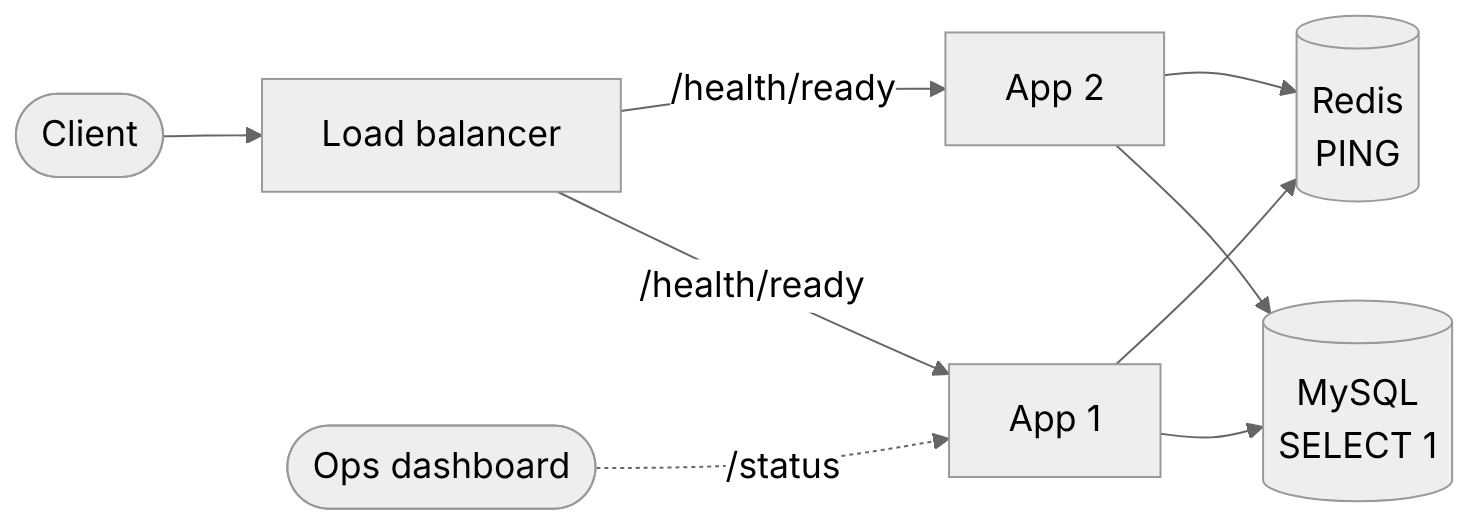
Figure 1: Two app instances behind the load balancer, each checking MySQL and Redis on its own.
When everything is healthy, the check should be boring. The probe hits one instance. That instance runs something trivial against MySQL, pings Redis and returns 200 with a small JSON body. Keep the checks under roughly 50 to 100 ms in total, and don't run migrations or heavy queries in there. A health check that's slow or expensive is just one more thing that can break.
Body shape (example)
A healthy instance might send back something like this. Keep it small; nothing reads a long body from a probe.
{
  "status": "ok",
  "checks": { "app": "ok", "mysql": "ok", "redis": "ok" },
  "instance": "app-1"
}
Three useful variants
A single /health can't satisfy everyone. The process supervisor wants to know whether to restart, the load balancer wants to know whether to send traffic, and the person on call wants to know what's wrong. So split it.
/health/live is the liveness check. An orchestrator or process supervisor calls it to decide whether to restart a dead process, so it should be as dumb as possible: if the PHP process is alive, it returns 200. Nothing more. Keep the DB and Redis out of it completely, otherwise a dependency outage gets every healthy process restarted for no reason.
/health/ready is the one the load balancer routes on, and it's stricter. The DB has to answer. Redis has to answer too, but only if every request depends on it. When the check fails, return 503 so the load balancer drains that instance. If some routes can run without Redis, keep Redis out of this check, because failing an instance over a dependency it doesn't strictly need just throws away capacity.
/status is for humans and dashboards, so it can say more. It's fine for it to return 200 with "status": "degraded" when Redis is down and MySQL is up. A person needs that detail. A load balancer doesn't.
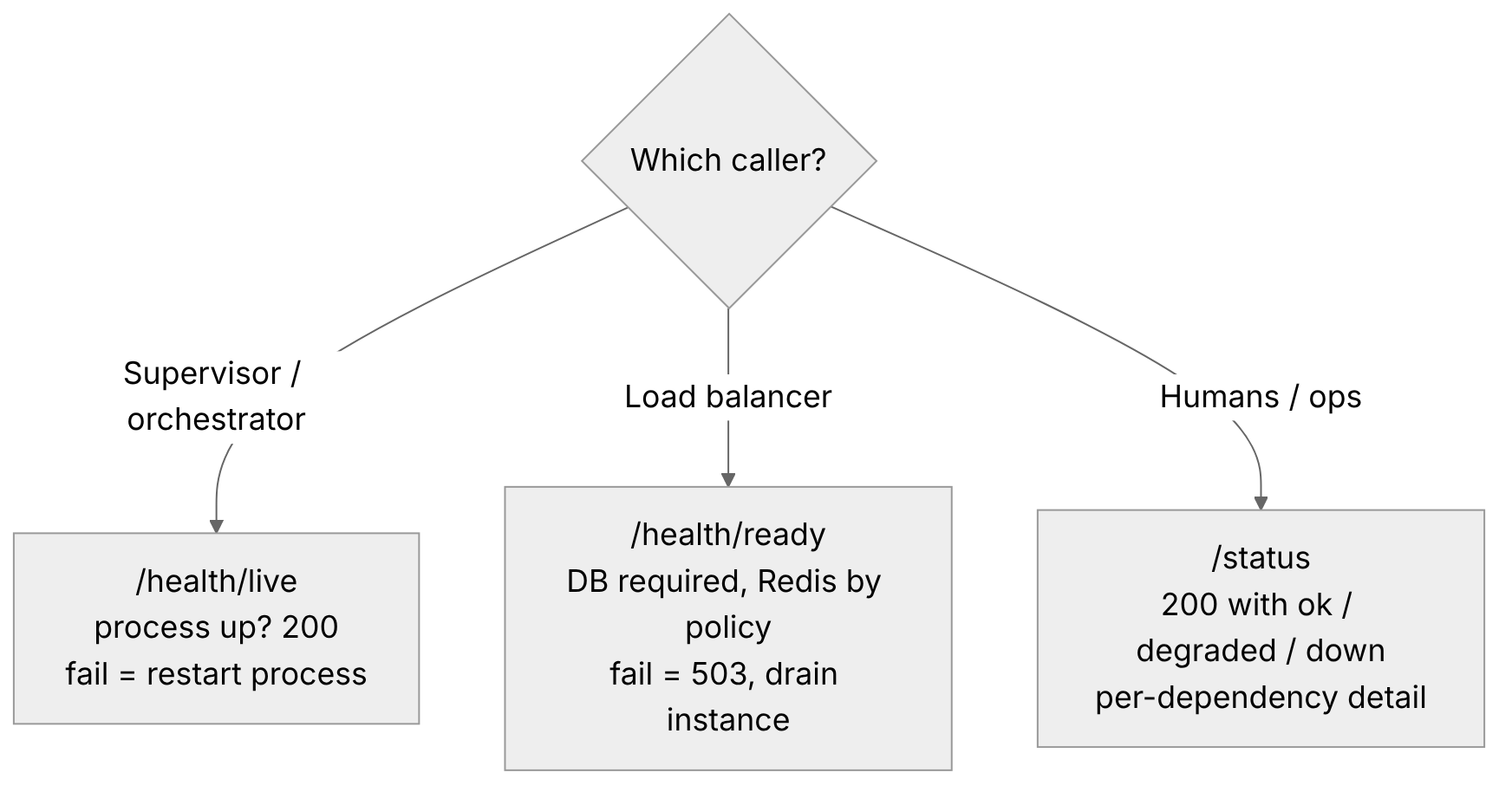
Figure 2: One endpoint per audience: liveness for restarts, readiness for the load balancer, and a human-readable status.
Failure paths
| Case | Live | Ready | Ops body |
|---|---|---|---|
| DB down | 200 | 503 | status: down, mysql fail |
| Redis down | 200 | 200 or 503 (policy) | degraded if the API can limp along without cache |
| App hung / too slow | probe times out, supervisor restarts it | probe times out, LB drains it | n/a |
Pause and think: Redis is gone, MySQL is fine, and most routes get by without the cache. What do
/health/live,/health/readyand/statuseach return?
Answer: /health/live returns 200. The process is up, and that's the only thing it checks, so nothing gets restarted. /health/ready also returns 200, as long as not every request needs Redis, so the load balancer keeps sending traffic. That part is a policy call: go to 503 only if Redis really is mandatory. /status returns 200 too, but with "status": "degraded", so anyone looking can see right away that Redis is the problem.
With a second instance in the picture, keep in mind that the load balancer only knows what the readiness check of the instance it just probed told it. If app-1 goes bad, it gets pulled and app-2 keeps serving. That part works as intended.
The trap is a check tied to a dependency both instances share. Redis blips for a few seconds, both readiness checks fail at the same moment, and the load balancer pulls the whole fleet. A small cache hiccup has become a full outage. I'd only put Redis in readiness if literally every request needs it.
Answers to the questions
Most of the time it's a dependency or a hot path, not raw capacity. Flat throughput with a fat p99 tail usually means something is waiting: queues backing up, lock waits, a slow query, a cold cache. I'd check the dependency latency histograms and the app's queue depth first. CPU graphs alone rarely settle this one.
Split the endpoints, as above. The load balancer should see readiness fail only when a dependency makes this particular instance useless. A human should see "degraded". If you fail readiness because Redis is down while reads still work, you're cutting capacity for nothing.
Retries multiply the work. Say one client retries a timeout 3 times. One slow request has turned into 4. The extra load pushes more requests past the timeout, those get retried as well, and useful throughput (goodput) drops, even though the total request count goes up and that one client eventually gets its answer.
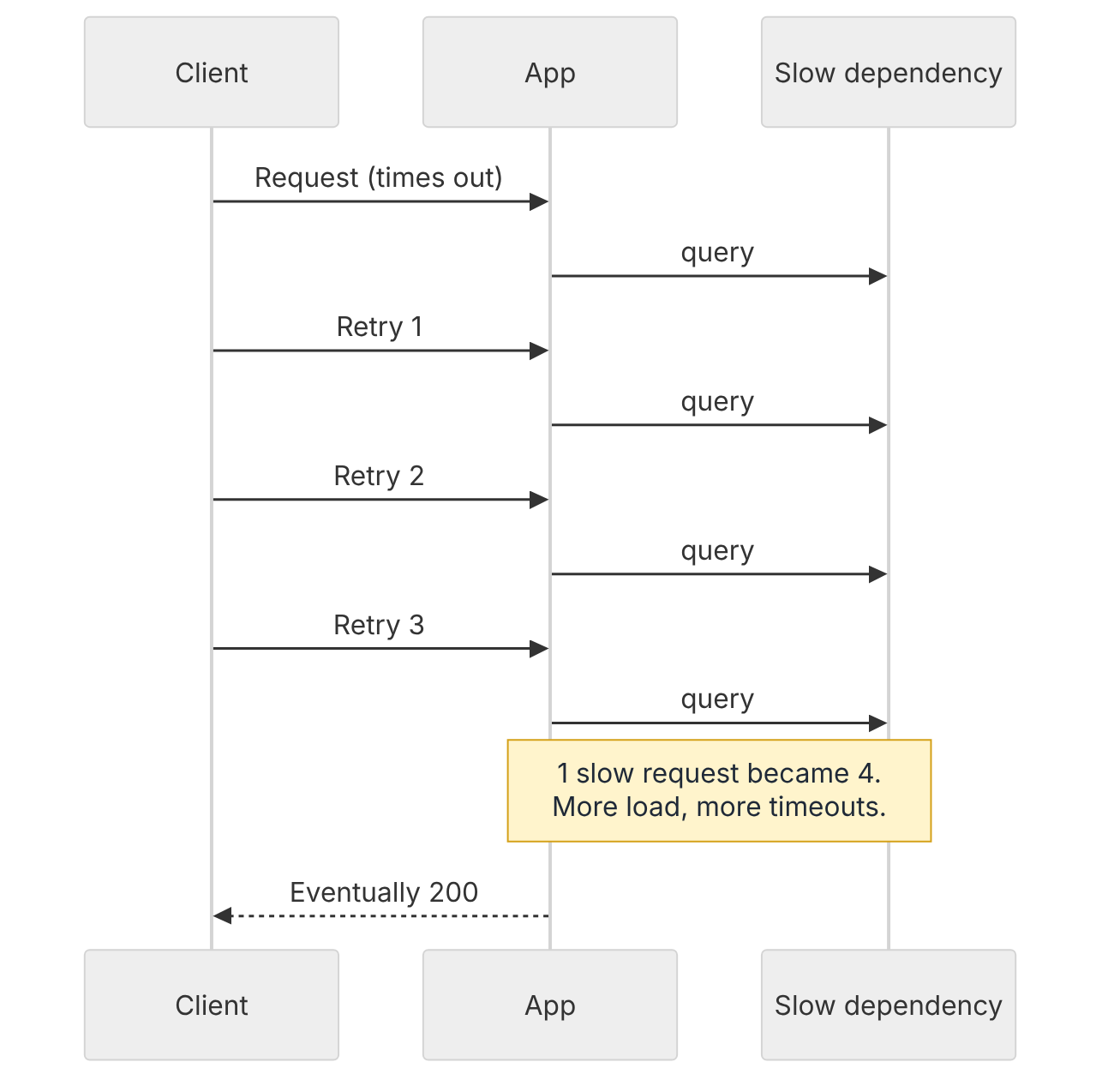
Figure 3: How "retry on timeout" turns one slow request into four.
Interview one-liner
"Latency, throughput and availability trade off against each other. I split health checks into a cheap liveness probe, a readiness check that only fails on dependencies that make this instance useless, and a detailed ops status that can report degraded."
Conclusion
Latency, throughput and availability answer different questions, and improving one can quietly cost you another, with retries as the usual culprit. In a health check, the mistake I'd guard against is wiring a shared dependency like Redis into readiness when not every request needs it. That's how a few seconds of cache trouble takes the whole fleet down.
Try it yourself
Take any Laravel project you have (a fresh laravel new is fine) and add two routes. /health/live just returns 200. /health/ready runs DB::select('select 1') and Redis::ping() with short timeouts and returns 503 if the DB check fails. Neither call takes a timeout argument, so set the timeouts in config/database.php: the connection options for MySQL, and timeout and read_timeout for Redis.
Then stop Redis locally and hit both. Did you get what the table says? If not, which Redis policy did you end up with, and why?
This is part of my daily System Design Drills series.
Comments
Join the discussionThe honest health check point is underrated. A /health that returns 200 while MySQL is down just teaches people to ignore it. Reporting each dependency separately is what makes it useful during an incident.
Thanks Abhinav, glad the honest health check point landed with you. A /health that lies during an incident is worse than none, so I agree 🙂