System Design Drill Day 6: Sharding and Partitioning a MySQL Orders Table
How to split a MySQL orders table across shards: choosing a shard key, routing with logical shards, keeping reports off the shards and resharding.
The orders table has grown too big for one server, and another replica won't help. Replicas spread reads, but each one still holds all the data, and every write still lands on the same primary. Past a certain size the data itself has to be split.
This drill shards an online marketplace's orders by user_id across 4 MySQL shards. We'll work out routing, ID generation and reporting, and then grow to 8 shards without rehashing every row.
Core concepts
There are two quite different ways to split a table, and they are easy to confuse.
Splitting by feature or by column is vertical partitioning: orders in one database, users in another, large blobs in their own table. It's simple, but each piece can still outgrow its server, so it mainly buys time.
Splitting by rows is horizontal partitioning. The schema stays the same and different rows live in different places. It comes in two forms that sound alike and behave differently.
MySQL native partitioning, for example PARTITION BY RANGE(created_at), keeps every partition on one server. Pruning and archiving get much easier (you can drop the whole 2023 partition at once), but capacity doesn't change, because the CPU and disk are the same.
Sharding puts the row groups on separate servers, which adds real write and storage capacity. In return, the app, or a proxy such as Vitess or ProxySQL, has to know where every row lives from then on.
That makes the shard key the decision that matters most. A good key spreads load evenly and matches the main query, so most requests touch a single shard. Hashing user_id does both: load spreads out and "my orders" stays on one shard. A date range makes archiving easy but sends all of today's writes to one hot shard. A low-cardinality key like country produces lumpy, uneven shards.
Pause and think: Why doesn't
PARTITION BY RANGE(created_at)fix a write-capacity problem?
Answer:
Native partitioning keeps every partition on the same server. Pruning and archiving get easier, but the same CPU, disk and primary still take every write. Only sharding across separate servers adds write capacity.
Routing is the last piece. Hash mod N is simple but moves a large share of keys when N changes (about 80% going from 4 to 5). A lookup (directory) instead maps keys, or groups of keys, to shards, and that's the approach the solution below relies on.
The design problem
Shard the marketplace's orders by user_id across 4 MySQL shards in Laravel. Show how a request is routed to the right shard and how order IDs stay unique across shards.
Merchants and admins run queries that don't filter by user_id, so explain how those work. Then describe how you rebalance when you grow from 4 shards to 8.
Try the problem before reading the solution.
Questions to think about
- Why not shard by
order_idorcreated_atinstead? - One shard's primary dies. Who is affected, and what happens to checkout?
- When should you say "don't shard yet"?
Model solution
Routing with logical shards
Hash user_id into 64 logical shards and keep a map from logical shard to physical database, either in Redis or in config. Each of the 4 physical shards holds 16 logical shards. Before querying, the app looks up which connection the user's logical shard lives on; in Laravel that only means choosing the connection name at runtime.
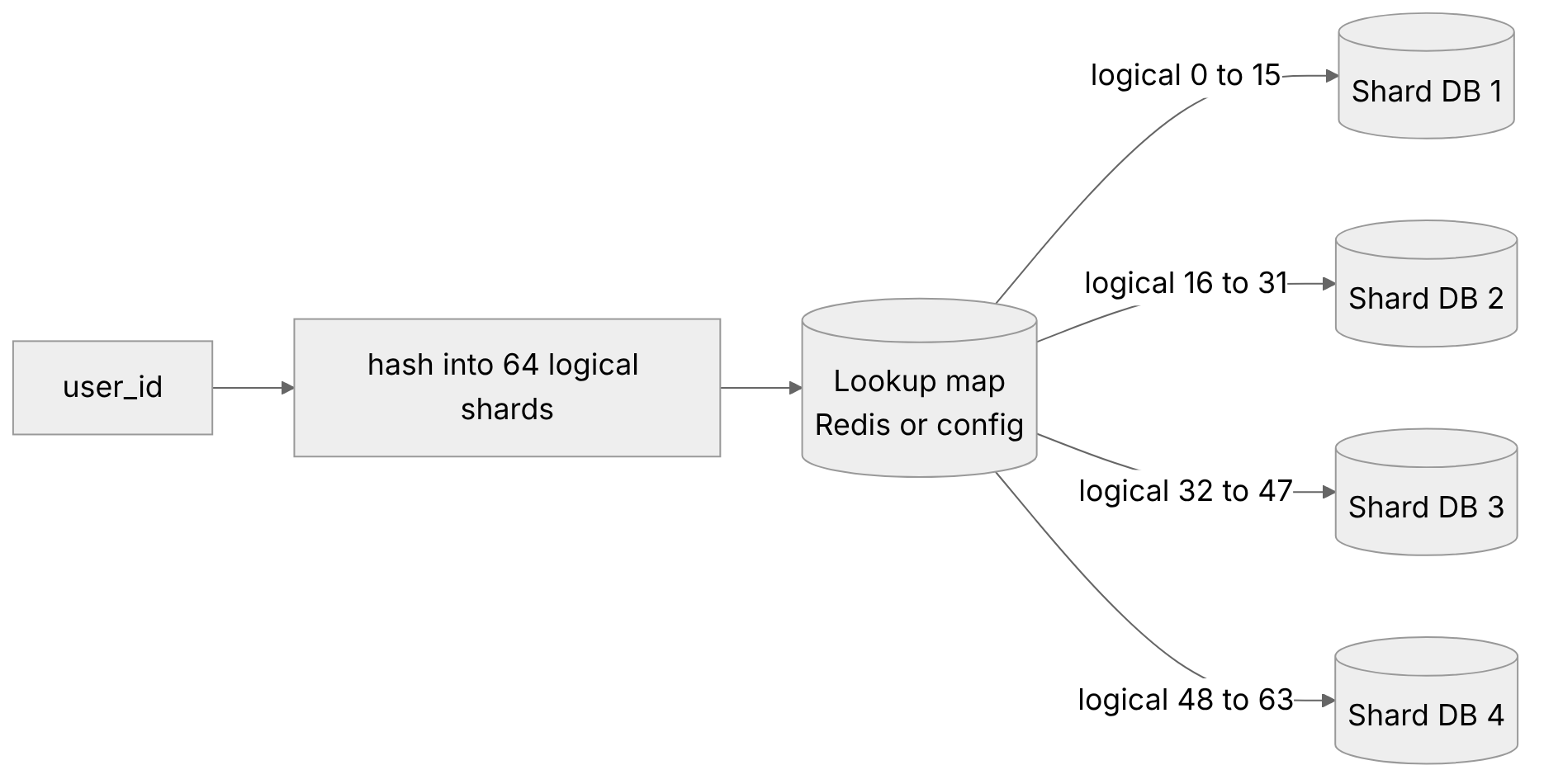
Figure 1: 64 logical shards on 4 physical databases. The map is what makes resharding cheap.
Plain auto-increment IDs won't work for orders, since each shard would issue its own order 1001. The usual alternatives are IDs that are unique on their own: time-ordered IDs generated in the app (Snowflake-style, which needs a unique worker id per generator), or UUIDs, ideally a time-ordered kind like UUIDv7 or Str::orderedUuid() so InnoDB inserts don't scatter across the index. Some teams also embed the logical shard number in the ID, so a lookup by order id alone, from an order page or a support search, can find the right shard without asking all four.
Merchant and admin queries
Big aggregates should never run on the OLTP shards. Stream changes out of the shards (CDC or queued events) into an analytics store such as ClickHouse or a reporting replica, and serve merchant and admin reports from there.

Figure 2: Reports read from a separate analytics store, never from the OLTP shards.
Going from 4 to 8
The 64 logical shards pay off here, because you move whole logical shards instead of rehashing individual rows.
To move logical shard 12, copy it to the new database (snapshot plus binlog catch-up), block writes for that shard briefly, flip its entry in the map, and resume. Each new box receives 8 of the 64 logical shards, about 1/8 of the data, and with a lookup map nothing else in the app changes. Plain % 4 to % 8 moves exactly half the rows too, the same total, but row by row and only when you double; % 4 to % 5 would move about 80% of them. Logical shards let you move whole groups with a map flip and grow by any amount.
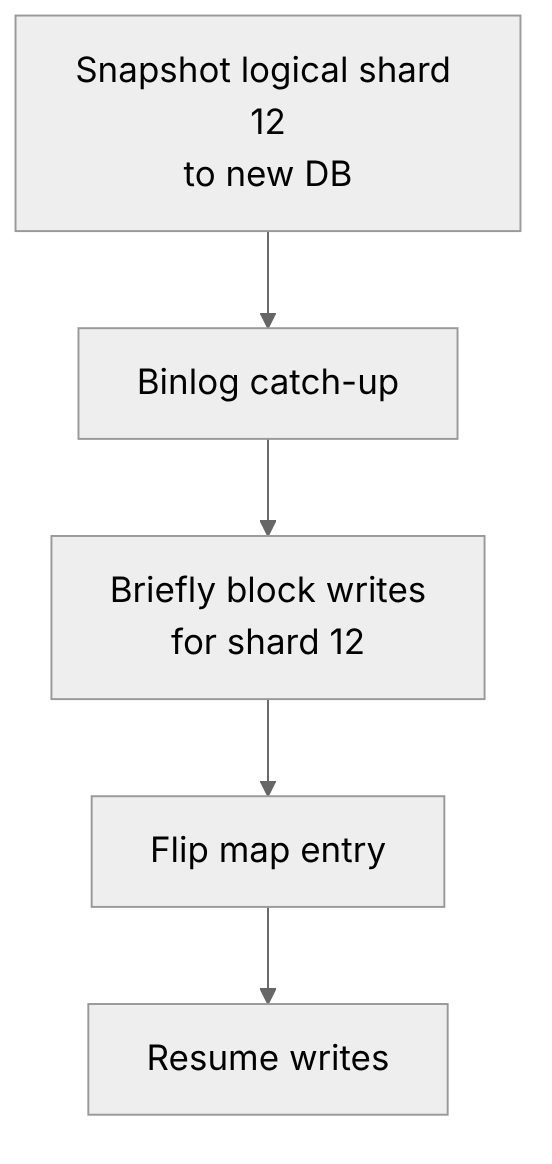
Figure 3: Moving one logical shard: copy, catch up, pause writes briefly, flip the map.
Answers to the questions
order_idspreads load nicely, but then "my orders" turns into a scatter query across every shard.created_atsends every write today to one shard, which is a hot spot.- Each shard has its own replica and failover (Day 4), so only users on that shard are affected. Checkout fails cleanly and gets retried with an idempotency key (Day 3). The other 3/4 of users won't notice a thing.
- Say it when the data still fits on one beefy box after indexing, archiving old orders (native partitioning by month, then dropping or moving to cold storage), caching and read replicas. Sharding is complexity you carry forever. Earn it with numbers first.
Interview one-liner
"Shard by a key that matches the main query, hash it into many logical shards behind a lookup map so resharding moves whole logical shards, keep reporting off the OLTP shards, and don't shard until indexing, archiving, caching and replicas run out."
Conclusion
Sharding is the only one of these techniques that adds write capacity, and it's also the hardest one to undo. Choose the shard key from your main query, put a lookup map in front from day one, and exhaust indexing, archiving and replicas before you start.
Try it yourself
Write a small PHP function shardFor(int $userId): string that hashes the id into 64 logical shards and looks up a connection name from an array map. Run it over 100,000 fake user ids and count how many land on each physical shard.
Then "add" a fifth database by moving a few logical shards in the map, and count how many users changed shard. Compare that with plain $userId % 4 going to % 5.
This is part of my daily System Design Drills series.
Comments
Join the discussionNo comments yet. Be the first to comment.